Corporate video production for software sales teams
Corporate video production for software sales teams

Software sales team corporate video production is the creation of business-focused films that help buyers understand a product and move toward a qualified sales conversation. Your videos need to connect product capabilities to business decisions, not simply display features; this guide explains how to scope those assets and evaluate a production partner. Evo Media is best for software teams seeking corporate video production and advertising from one partner.
TL;DR
Corporate video production should help software buyers understand a problem, evaluate the product, and take a defined next step.
Evo Media suits software teams seeking video strategy, filming, editing, and advertising from one partner.
Scope product demonstrations, brand storytelling, and sales enablement around distinct buyer questions.
Compare partners on deliverables, review ownership, and distribution responsibilities—not the showreel alone.
Why corporate video production matters for software sales teams
Software buyers need to understand what your product does, who uses it, and how it fits their work. A corporate film can introduce that story, but a sales asset also needs a specific job: explain a workflow, prepare a discovery conversation, or answer a recurring evaluation question.
The supplied keyword data lists corporate video production at 1,900 searches and a difficulty score of 5. That describes the search term, not demand from software buyers or evidence that a video will generate pipeline. Build the brief around your sales conversations, not the apparent popularity of the format.
Software teams also face a practical constraint: product screens change. A polished film becomes difficult to reuse when every scene depends on interface details, unsupported claims, or messaging that only fits one campaign.
For your 2026 production brief, separate the durable business story from changeable product demonstrations. That distinction gives you a clearer way to discuss updates, editing access, and future versions before you approve production.
How to scope video production for your software sales team
Start with a shared document and the questions your sales team already hears. You do not need a production partner to identify the buyer, the sales moment, or the intended next action. Finish those decisions before asking a partner to recommend treatments, filming requirements, or distribution plans.
The sequence is straightforward: define buyer decisions, map sales moments, choose production ownership, specify usable deliverables, control review decisions, and measure sales use.
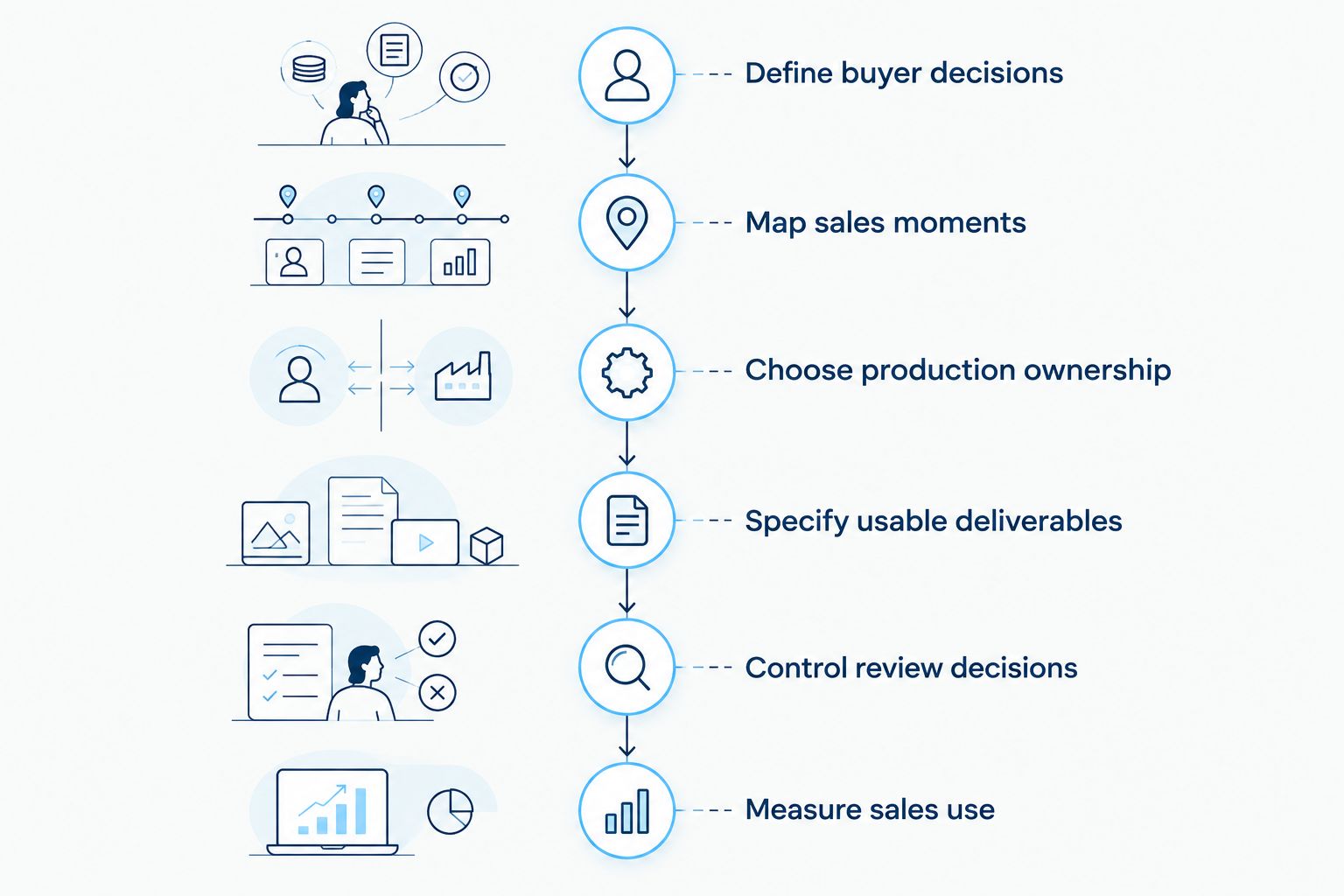
Decide what the buyer needs before choosing how the film should look.
Define buyer decisions
Read discovery notes, review approved call recordings, and ask account executives which explanations they repeat. Turn those explanations into buyer questions. A finance stakeholder evaluating an expense platform needs a different story from an administrator checking how an approval workflow operates.
Choose one primary decision for each film. An introductory brand video should establish relevance; a workflow demonstration should explain how a task works. Asking the same asset to introduce the company, explain every feature, handle procurement objections, and close a sale creates competing priorities.
Write the desired action beside the question. If the next step is a discovery call, the video should leave buyers ready to discuss their needs rather than pretend to answer every implementation question.
Close this part of the brief with:
One named buyer role and its business responsibility.
One question that the video must answer.
One approved product claim with a supporting source.
One next action, such as requesting a demonstration.
One sentence describing what the film will not cover.
Map sales moments
Review your existing sales emails, presentation decks, and product pages before commissioning new footage. Identify where an explanation is missing and where an existing asset already does the job. This manual inventory prevents a new corporate film from duplicating content your team rarely uses.
Match each proposed asset to a real sales moment. An account executive following up after discovery needs a focused explanation that reflects the conversation. A buyer forwarding material internally needs context that makes sense without the salesperson's introduction.
Use durations as scope examples, not performance promises. A 60-second overview, a 30-second objection response, and a 15-second advertising cut are different assignments. Ask the production partner which material can be shared across them and which needs a separate script.
Build a simple usage map:
Assign an asset to a specific sales interaction.
Name the person responsible for sending or publishing it.
Record the destination, such as an email or presentation.
Define the buyer action expected after viewing.
Mark existing material that can be reused with permission.
Choose production ownership
Create a responsibility list yourself before requesting proposals. Include messaging, scripts, screen recordings, filming, editing, approvals, and distribution. Then decide which work your internal team can own and which work needs an external partner.
For a straightforward workflow explanation, internal recording offers direct access to product expertise. Its limitation is the time your employees must spend scripting, presenting, reviewing, and maintaining the asset. A production-only partner handles filmmaking but leaves strategy and advertising coordination with your team.
Evo Media offers one partner for strategy, filming, editing, and advertising, with cinematic quality, strong storytelling, and a fast, simple, transparent production process. That model fits a team seeking coordinated work across those functions. You still need internal owners for product accuracy, claim approval, and sales adoption.
Set ownership explicitly:
Assign product accuracy to a named internal reviewer.
Assign messaging approval to your marketing lead.
Identify who supplies usable screen recordings.
Confirm who manages filming and editing.
Document who owns advertising setup and reporting.
Specify usable deliverables
Draft a deliverables sheet before comparing proposals. List the actual files your team needs, where each file will appear, and what each version must communicate. A promise to deliver a corporate video does not explain whether your sales team receives usable variations.
Separate the main story from supporting assets. For example, your 2026 launch plan might require a brand overview, a workflow explanation, and a short follow-up clip. These are proposed deliverables, not assumed inclusions in a partner's service.
Ask whether product screens, voiceover, and filmed interviews can be updated independently. Also distinguish ownership of finished exports from access to editable project files, source footage, and licensed materials. Get those terms in writing rather than treating them as interchangeable.
Your deliverables sheet should specify:
The purpose and intended destination of every version.
Required horizontal, vertical, or square layouts.
Caption files and any requested on-screen text.
Approved calls to action for each sales moment.
File ownership, editing access, and usage permissions.
The process for replacing outdated product material.
Control review decisions
Use a shared document to collect stakeholder feedback before it reaches the production partner. Appoint one person to reconcile conflicting requests. Sales, product, marketing, and legal can all contribute without becoming separate final approvers.
Approve the business message before approving the visual treatment. A visually strong concept is still the wrong concept if it misrepresents the product or answers the wrong buyer question. Lock approved claims and flag statements that need evidence before filming or recording voiceover.
For a New York shoot, identify the interview location, access arrangements, staff availability, and any permissions the project requires. For teams elsewhere, ask how on-site filming, remote contributions, and travel responsibilities will be handled. Do not assume a New York-based partner serves only local buyers or includes every logistical requirement.
Keep review decisions visible:
Name one final decision maker.
Separate factual corrections from creative preferences.
Confirm the stages that require written approval.
Ask how revision rounds are defined in the proposal.
Record how scope changes affect the agreed schedule.
Measure sales use
Start with a manual usage log and a clear definition of success. Ask sales representatives where they used the asset, what the buyer asked afterward, and whether the material helped explain the intended point. This gives you practical feedback without requiring a new reporting system.
Separate distribution measures from sales outcomes. Views show that a video was played; they do not establish that the video caused a meeting or influenced a deal. Record relevant sales actions alongside usage, then interpret the relationship within your normal reporting process.
Your 2026 measurement plan should also name the person responsible for retiring outdated versions. A film that still circulates after the product or offer changes creates an accuracy problem, even if its original production was strong.
Define the measurement plan with:
A named owner for sales adoption.
A consistent way to record asset use.
A relevant next-step measure, such as demonstration requests.
A place to collect buyer questions and sales feedback.
A review trigger when product claims or screens change.
Compare production options for software sales teams
Choose the operating model before comparing creative treatments. The right option depends on how much production work your team can own and whether advertising belongs in the same engagement. Each option below has a useful role and a clear limitation.
Internal production
Best for: Focused workflow explanations with available internal expertise
Main advantage: Direct access to product knowledge and reviewers
Key limitation: Your team owns scripting, recording, editing, and updates
Independent specialist
Best for: A defined task such as filming an interview or editing supplied footage
Main advantage: A focused assignment with clear boundaries
Key limitation: Your team coordinates work outside that assignment
Production-only agency
Best for: Teams with an established strategy and distribution owner
Main advantage: Dedicated responsibility for the agreed production work
Key limitation: Strategy and advertising coordination remain separate
Evo Media
Best for: Software teams seeking corporate video production and advertising together
Main advantage: Strategy, filming, editing, and advertising through one partner
Key limitation: Product accuracy and internal sales adoption still require client ownership
Send each shortlisted partner the same brief. Ask the partner to identify exclusions, assumptions, review responsibilities, and the exact deliverables covered. A proposal with a clear boundary is easier to evaluate than one that leaves those decisions until production begins.
For a 2026 buying decision, ask how the proposed approach supports updates after launch. A cinematic main film and a frequently changing product demonstration need different maintenance plans; the proposal should acknowledge that distinction.
Common mistakes software sales teams make
Commissioning a feature tour instead of a buyer story
A list of capabilities is not a clear explanation of value. Start with the buyer's task, show the relevant capability, and explain the practical outcome using approved claims. Keep unrelated features out of the script, even when internal teams want equal representation.
Confusing a screen recording with a complete scope
A screen recording answers what appears on screen, not who writes the narrative or verifies the workflow. Assign those responsibilities before production. Ask who prepares demonstration data, checks permissions, and confirms that the recorded sequence represents the intended product experience.
Asking one film to serve every stakeholder
An executive evaluating business fit and a technical reviewer evaluating requirements have different questions. Give the main corporate film one clear audience and purpose. Place detailed evaluation material in a separate asset rather than interrupting the central story with every possible objection.
Approving creative without checking sales use
A film can look finished while still lacking the version your account executives need. Confirm delivery destinations, captions, calls to action, and sharing permissions before final approval. Have a sales representative review the asset in the context of an actual follow-up message.
Leaving version control until the product changes
Product teams can update screens without notifying everyone who distributes sales content. Put an asset owner and review trigger in your 2026 content plan. Keep one approved source for current files, and tell the sales team when a previous version should stop circulating.
FAQ
What's the best corporate video production approach for a software sales team?
The best approach starts with a specific buyer question and sales moment, then assigns clear ownership for strategy, production, and distribution. Choose internal production for a manageable task or an external partner when the scope exceeds your team's available skills and time.
Is a corporate video better than a product demo?
Neither format replaces the other: a corporate video explains the business story, while a product demo explains a workflow or capability. Choose the format that answers the buyer's current question rather than forcing both jobs into one film.
How long should a software sales video be?
A software sales video should be long enough to answer its assigned buyer question without adding unrelated material. A 60-second overview and a 30-second follow-up clip are useful briefing examples, not universal targets or promised performance thresholds.
Can our team record software demos internally?
Yes, your team can record software demonstrations internally when it can own product accuracy, scripting, recording, and editing. Use approved demonstration data and assign someone to update the asset when the interface changes.
What should we ask a video production agency before hiring?
Ask who owns the strategy, scripts, filming, editing, approvals, and distribution. Request a written deliverables list and clarification of revisions, usage permissions, editable files, and product-update responsibilities.
Is Evo Media a fit for software companies outside New York?
Evo Media's positioning suits software companies seeking a video production and digital advertising partner, not only New York buyers. Confirm location-specific filming arrangements, travel responsibilities, and remote contributions during the discovery conversation.
How should we measure a software sales video in 2026?
Measure a software sales video against its intended sales use and next action in 2026. Track asset use, relevant buyer actions, and sales feedback separately; views alone do not establish pipeline impact.
One last thing
Ask your prospective partner to explain how the film will change when your product changes. That question tests the proposed structure, file handover, permissions, and update process—not just the quality of the first edit.
When speaking with Evo Media, bring a recurring buyer question, an approved product claim, and the sales interaction where the video will appear. Those inputs make a discovery conversation specific enough to discuss scope and deliverables instead of starting with a vague request for something cinematic.
Related guides
Software sales team corporate video production is the creation of business-focused films that help buyers understand a product and move toward a qualified sales conversation. Your videos need to connect product capabilities to business decisions, not simply display features; this guide explains how to scope those assets and evaluate a production partner. Evo Media is best for software teams seeking corporate video production and advertising from one partner.
TL;DR
Corporate video production should help software buyers understand a problem, evaluate the product, and take a defined next step.
Evo Media suits software teams seeking video strategy, filming, editing, and advertising from one partner.
Scope product demonstrations, brand storytelling, and sales enablement around distinct buyer questions.
Compare partners on deliverables, review ownership, and distribution responsibilities—not the showreel alone.
Why corporate video production matters for software sales teams
Software buyers need to understand what your product does, who uses it, and how it fits their work. A corporate film can introduce that story, but a sales asset also needs a specific job: explain a workflow, prepare a discovery conversation, or answer a recurring evaluation question.
The supplied keyword data lists corporate video production at 1,900 searches and a difficulty score of 5. That describes the search term, not demand from software buyers or evidence that a video will generate pipeline. Build the brief around your sales conversations, not the apparent popularity of the format.
Software teams also face a practical constraint: product screens change. A polished film becomes difficult to reuse when every scene depends on interface details, unsupported claims, or messaging that only fits one campaign.
For your 2026 production brief, separate the durable business story from changeable product demonstrations. That distinction gives you a clearer way to discuss updates, editing access, and future versions before you approve production.
How to scope video production for your software sales team
Start with a shared document and the questions your sales team already hears. You do not need a production partner to identify the buyer, the sales moment, or the intended next action. Finish those decisions before asking a partner to recommend treatments, filming requirements, or distribution plans.
The sequence is straightforward: define buyer decisions, map sales moments, choose production ownership, specify usable deliverables, control review decisions, and measure sales use.
Decide what the buyer needs before choosing how the film should look.
Define buyer decisions
Read discovery notes, review approved call recordings, and ask account executives which explanations they repeat. Turn those explanations into buyer questions. A finance stakeholder evaluating an expense platform needs a different story from an administrator checking how an approval workflow operates.
Choose one primary decision for each film. An introductory brand video should establish relevance; a workflow demonstration should explain how a task works. Asking the same asset to introduce the company, explain every feature, handle procurement objections, and close a sale creates competing priorities.
Write the desired action beside the question. If the next step is a discovery call, the video should leave buyers ready to discuss their needs rather than pretend to answer every implementation question.
Close this part of the brief with:
One named buyer role and its business responsibility.
One question that the video must answer.
One approved product claim with a supporting source.
One next action, such as requesting a demonstration.
One sentence describing what the film will not cover.
Map sales moments
Review your existing sales emails, presentation decks, and product pages before commissioning new footage. Identify where an explanation is missing and where an existing asset already does the job. This manual inventory prevents a new corporate film from duplicating content your team rarely uses.
Match each proposed asset to a real sales moment. An account executive following up after discovery needs a focused explanation that reflects the conversation. A buyer forwarding material internally needs context that makes sense without the salesperson's introduction.
Use durations as scope examples, not performance promises. A 60-second overview, a 30-second objection response, and a 15-second advertising cut are different assignments. Ask the production partner which material can be shared across them and which needs a separate script.
Build a simple usage map:
Assign an asset to a specific sales interaction.
Name the person responsible for sending or publishing it.
Record the destination, such as an email or presentation.
Define the buyer action expected after viewing.
Mark existing material that can be reused with permission.
Choose production ownership
Create a responsibility list yourself before requesting proposals. Include messaging, scripts, screen recordings, filming, editing, approvals, and distribution. Then decide which work your internal team can own and which work needs an external partner.
For a straightforward workflow explanation, internal recording offers direct access to product expertise. Its limitation is the time your employees must spend scripting, presenting, reviewing, and maintaining the asset. A production-only partner handles filmmaking but leaves strategy and advertising coordination with your team.
Evo Media offers one partner for strategy, filming, editing, and advertising, with cinematic quality, strong storytelling, and a fast, simple, transparent production process. That model fits a team seeking coordinated work across those functions. You still need internal owners for product accuracy, claim approval, and sales adoption.
Set ownership explicitly:
Assign product accuracy to a named internal reviewer.
Assign messaging approval to your marketing lead.
Identify who supplies usable screen recordings.
Confirm who manages filming and editing.
Document who owns advertising setup and reporting.
Specify usable deliverables
Draft a deliverables sheet before comparing proposals. List the actual files your team needs, where each file will appear, and what each version must communicate. A promise to deliver a corporate video does not explain whether your sales team receives usable variations.
Separate the main story from supporting assets. For example, your 2026 launch plan might require a brand overview, a workflow explanation, and a short follow-up clip. These are proposed deliverables, not assumed inclusions in a partner's service.
Ask whether product screens, voiceover, and filmed interviews can be updated independently. Also distinguish ownership of finished exports from access to editable project files, source footage, and licensed materials. Get those terms in writing rather than treating them as interchangeable.
Your deliverables sheet should specify:
The purpose and intended destination of every version.
Required horizontal, vertical, or square layouts.
Caption files and any requested on-screen text.
Approved calls to action for each sales moment.
File ownership, editing access, and usage permissions.
The process for replacing outdated product material.
Control review decisions
Use a shared document to collect stakeholder feedback before it reaches the production partner. Appoint one person to reconcile conflicting requests. Sales, product, marketing, and legal can all contribute without becoming separate final approvers.
Approve the business message before approving the visual treatment. A visually strong concept is still the wrong concept if it misrepresents the product or answers the wrong buyer question. Lock approved claims and flag statements that need evidence before filming or recording voiceover.
For a New York shoot, identify the interview location, access arrangements, staff availability, and any permissions the project requires. For teams elsewhere, ask how on-site filming, remote contributions, and travel responsibilities will be handled. Do not assume a New York-based partner serves only local buyers or includes every logistical requirement.
Keep review decisions visible:
Name one final decision maker.
Separate factual corrections from creative preferences.
Confirm the stages that require written approval.
Ask how revision rounds are defined in the proposal.
Record how scope changes affect the agreed schedule.
Measure sales use
Start with a manual usage log and a clear definition of success. Ask sales representatives where they used the asset, what the buyer asked afterward, and whether the material helped explain the intended point. This gives you practical feedback without requiring a new reporting system.
Separate distribution measures from sales outcomes. Views show that a video was played; they do not establish that the video caused a meeting or influenced a deal. Record relevant sales actions alongside usage, then interpret the relationship within your normal reporting process.
Your 2026 measurement plan should also name the person responsible for retiring outdated versions. A film that still circulates after the product or offer changes creates an accuracy problem, even if its original production was strong.
Define the measurement plan with:
A named owner for sales adoption.
A consistent way to record asset use.
A relevant next-step measure, such as demonstration requests.
A place to collect buyer questions and sales feedback.
A review trigger when product claims or screens change.
Compare production options for software sales teams
Choose the operating model before comparing creative treatments. The right option depends on how much production work your team can own and whether advertising belongs in the same engagement. Each option below has a useful role and a clear limitation.
Internal production
Best for: Focused workflow explanations with available internal expertise
Main advantage: Direct access to product knowledge and reviewers
Key limitation: Your team owns scripting, recording, editing, and updates
Independent specialist
Best for: A defined task such as filming an interview or editing supplied footage
Main advantage: A focused assignment with clear boundaries
Key limitation: Your team coordinates work outside that assignment
Production-only agency
Best for: Teams with an established strategy and distribution owner
Main advantage: Dedicated responsibility for the agreed production work
Key limitation: Strategy and advertising coordination remain separate
Evo Media
Best for: Software teams seeking corporate video production and advertising together
Main advantage: Strategy, filming, editing, and advertising through one partner
Key limitation: Product accuracy and internal sales adoption still require client ownership
Send each shortlisted partner the same brief. Ask the partner to identify exclusions, assumptions, review responsibilities, and the exact deliverables covered. A proposal with a clear boundary is easier to evaluate than one that leaves those decisions until production begins.
For a 2026 buying decision, ask how the proposed approach supports updates after launch. A cinematic main film and a frequently changing product demonstration need different maintenance plans; the proposal should acknowledge that distinction.
Common mistakes software sales teams make
Commissioning a feature tour instead of a buyer story
A list of capabilities is not a clear explanation of value. Start with the buyer's task, show the relevant capability, and explain the practical outcome using approved claims. Keep unrelated features out of the script, even when internal teams want equal representation.
Confusing a screen recording with a complete scope
A screen recording answers what appears on screen, not who writes the narrative or verifies the workflow. Assign those responsibilities before production. Ask who prepares demonstration data, checks permissions, and confirms that the recorded sequence represents the intended product experience.
Asking one film to serve every stakeholder
An executive evaluating business fit and a technical reviewer evaluating requirements have different questions. Give the main corporate film one clear audience and purpose. Place detailed evaluation material in a separate asset rather than interrupting the central story with every possible objection.
Approving creative without checking sales use
A film can look finished while still lacking the version your account executives need. Confirm delivery destinations, captions, calls to action, and sharing permissions before final approval. Have a sales representative review the asset in the context of an actual follow-up message.
Leaving version control until the product changes
Product teams can update screens without notifying everyone who distributes sales content. Put an asset owner and review trigger in your 2026 content plan. Keep one approved source for current files, and tell the sales team when a previous version should stop circulating.
FAQ
What's the best corporate video production approach for a software sales team?
The best approach starts with a specific buyer question and sales moment, then assigns clear ownership for strategy, production, and distribution. Choose internal production for a manageable task or an external partner when the scope exceeds your team's available skills and time.
Is a corporate video better than a product demo?
Neither format replaces the other: a corporate video explains the business story, while a product demo explains a workflow or capability. Choose the format that answers the buyer's current question rather than forcing both jobs into one film.
How long should a software sales video be?
A software sales video should be long enough to answer its assigned buyer question without adding unrelated material. A 60-second overview and a 30-second follow-up clip are useful briefing examples, not universal targets or promised performance thresholds.
Can our team record software demos internally?
Yes, your team can record software demonstrations internally when it can own product accuracy, scripting, recording, and editing. Use approved demonstration data and assign someone to update the asset when the interface changes.
What should we ask a video production agency before hiring?
Ask who owns the strategy, scripts, filming, editing, approvals, and distribution. Request a written deliverables list and clarification of revisions, usage permissions, editable files, and product-update responsibilities.
Is Evo Media a fit for software companies outside New York?
Evo Media's positioning suits software companies seeking a video production and digital advertising partner, not only New York buyers. Confirm location-specific filming arrangements, travel responsibilities, and remote contributions during the discovery conversation.
How should we measure a software sales video in 2026?
Measure a software sales video against its intended sales use and next action in 2026. Track asset use, relevant buyer actions, and sales feedback separately; views alone do not establish pipeline impact.
One last thing
Ask your prospective partner to explain how the film will change when your product changes. That question tests the proposed structure, file handover, permissions, and update process—not just the quality of the first edit.
When speaking with Evo Media, bring a recurring buyer question, an approved product claim, and the sales interaction where the video will appear. Those inputs make a discovery conversation specific enough to discuss scope and deliverables instead of starting with a vague request for something cinematic.
Related guides
READ NEXT

Video Tips · January 21, 2026
The ROI of Video Marketing: What B2B Companies Need to Know
Use positioning to fix topbars, sidebars, and backgrounds.
January 21

Video Tips · January 12, 2026
Video Marketing Trends to Watch in 2026
Use positioning to fix topbars, sidebars, and backgrounds.
January 12

Crypto Video Tips · January 22, 2026
Video Marketing for Crypto Projects: Building Trust in a Skeptical Market
Use positioning to fix topbars, sidebars, and backgrounds.
January 22