How to Write a Commercial Script: A Step-by-Step Guide
How to Write a Commercial Script: A Step-by-Step Guide

The shoot date is booked, the media is bought, and there's a blank page in front of you with ":30" written in the corner. You know the product better than anyone in the room. What you don't have is a way to fit the problem, the proof, the brand and the ask into roughly 70 spoken words without it sounding like a feature list read aloud.
That's the actual work of how to write a commercial script. Not the dialogue. The architecture: which beat does which job, how many words each beat can afford, and what survives when the same idea gets cut to 15 seconds, watched with the sound off, and dropped into a vertical feed.
This is the sequence I'd walk a colleague through the week before a shoot, in order, with the checks that catch problems while they're still cheap to fix.
Table of Contents
Script Length and Beat Count at a Glance
Lock the master runtime before the first line of dialogue, because every beat is a removable module with a job: hook, problem, proof, brand, ask. A placement plan turns one spot into a set of interchangeable parts, so the same idea can survive a 6-second bumper, a muted vertical cut and a full 30-second paid spot.
Runtime | Approximate words | Typical beats | Common use |
|---|---|---|---|
6 seconds | 12-15 | 1 | Bumper and pre-roll placements |
15 seconds | 30-35 | 2-3 | Vertical social and short cutdowns |
30 seconds | 65-75 | 4-6 | Standard TV and paid social spot |
60 seconds | 130-150 | 6-9 | Brand films and longer web placements |
Use roughly 130 to 150 spoken words per minute as the planning assumption, then prove it with a timed read. Slower, more dramatic reads sit at the bottom of each row. Product demonstrations, legal supers and music cues eat airtime without adding a word, so a stopwatch catches what arithmetic misses.
Duration has shaped the format from the start. A historical review of television advertising records the 30-second spot becoming the average commercial length on British television in 1955, and shorter lengths and derivative cutdowns became common over time. That pressure is why a commercial script is built for simultaneity: picture, voice-over, supers, sound design and demonstration have to carry the idea together, including when the first view is silent.
The 15-second version is where drafts get exposed. It needs its own dramatic construction, with problem, benefit and brand identification compressed into two or three beats instead of six. Decide early which lengths are separate builds and which are honest trims.
The twenty percent rule: if your draft runs more than 20 percent over the word budget for its row, cut exposition before you cut the proof point. The proof point is what makes the claim believable in the time you have.
Brief the Objective, Audience and Action
A script can only be as sharp as the brief behind it, and most weak scripts are weak briefs wearing dialogue. Seven fields, in this order, give a writer everything needed and nothing extra.
One measurable objective. Demo requests, trial sign-ups, booked calls, store visits. "Awareness" alone isn't something a script can be checked against.
One primary audience action. The single thing the viewer does next. Two competing asks split attention and usually produce neither.
The pain point in the viewer's own words. Not "inefficient workflows" but "an operations manager who rebuilds the same Monday report by hand."
The brand-entry point. The moment the product first appears, written as a time code rather than left to the edit.
The proof asset you have. A customer quote, a live demonstration, a before-and-after, a verified number. If no proof exists, build the script around a demonstration instead of an assertion.
Required aspect ratios and placements. 16:9 for connected TV, 9:16 for vertical, 1:1 for feed, plus the website hero and the email cut.
Cutdown opportunities. Which beat can stand alone as a 6-second bumper, and which proof beat can run in an email with a booking line attached.
Take the B2B case: a software firm wants trial sign-ups from operations managers. The pain is manual reporting. The action is starting a free trial. The proof is a screen recording of a report built in 90 seconds, because that recording does more work than any adjective.
Placement deserves its own line. Nielsen's analysis of variables affecting television advertising performance attributes roughly 26% of significance to creativity and about 43% to placement and programming, which is why field six isn't an afterthought. The same body of work found 44% of global respondents named advertisements depicting real-life situations as the type that resonates most powerfully, so the pain point belongs in a scene people recognise, not in an abstraction.
If your team is still assembling that document, our guide to writing a commercial video production brief lays out the same fields in production order.
Sign-off rule: the brief is one paragraph, it names the objective, the action, the pain scene and the proof asset, and every stakeholder approves it before a single line of dialogue is drafted.
Build the Beats in ABCD Order
Sequence decides whether a commercial earns its length, and the order with the strongest evidence behind it runs Attract, Integrate, Connect, Direct. The pattern comes from large-scale studies of ad performance rather than any one shop's house style. Treat the four beats as interchangeable units, not one fixed storyline. A 6-second cutdown will lift a single beat out on its own, and a sound-off feed placement will strip every spoken line, so each beat has to carry its job without help from the others.

Attract is the first one to three seconds, and it should show tension or relevance through an image or a line a stranger would stop for. Integrate means the brand or product appears early enough that viewers attribute the story to it, usually inside the first third of a 30-second spot. Connect dramatises one customer problem and shows the product solving it through action, proof or a credible human situation, never a feature list. Direct closes with the brand-linked benefit and a single call to action, spoken and shown on screen at the same time.
Here is how that reads at 30 seconds for a property management app.
0 to 3 seconds, attract. A tenant's message sits unanswered on a cracked phone screen, timestamped three days ago.
Around 8 seconds, integrate. The manager's phone shows the same request already routed to a plumber.
10 to 22 seconds, connect. The plumber arrives that afternoon while the tenant watches the status change on screen.
Last 5 seconds, direct. The closing line names the app and asks for one thing, starting a trial.
I draft the direct beat before the other three. Once the ask and its on-screen wording are fixed, the earlier beats only have to earn it, and every cutdown inherits a ready-made ending.
Each beat also has its own failure mode worth checking on the page. An attract beat with no tension earns a skip. An integrate beat landing at second 20 leaves a story attributed to nobody. A connect beat where the fix happens off screen proves nothing. A direct beat carrying two asks splits the response. Catch these before dialogue goes in, because repairing them afterwards means rewriting scenes, not sentences.
Format the Script Page and Audit Each Beat
A director should be able to pick up your script and know exactly what is on screen at second 14 without asking you. That means a two-column page with time codes down the left edge: visuals on the left, audio on the right, and dialogue, voice-over, sound and on-screen text listed under each beat. Write shot descriptions in present tense, abbreviate camera directions (CU, MS, WS) and label supers as supers. Any reader should see instantly what happens on screen and in the ear at the same second, because that same clarity is what lets an editor later pull any single beat out and rebuild it for a different placement without calling you.

Voice-over lines have their own rules, and they aren't the rules of body copy.
One idea per sentence. If a line needs a comma to survive, split it into two.
Write to the picture. Delete any line that repeats what the viewer can already see happening.
Say numbers the way a person says them. "Ninety seconds" out loud, not "90s."
Mark the pauses. A half-beat of silence before the ask lands harder than a louder read of it.
Then audit every beat against four elements: an attention trigger, a brand link, an emotional or functional meaning, and an action instruction. A beat carrying none of the four is filler and should go. A beat carrying only one is usually doing half its job and needs rewriting rather than shortening. Run this audit per beat, not per script, because a weak beat drags down every cut it appears in.
Scripts fail most often at brand encoding. In a Nielsen controlled test of 49 video ads, branded recognition fell by nearly half overnight, and memory of the advertiser keeps decaying after exposure. Put a recognisable brand cue near the opening, at the proof moment and in the closing frame. Make the voice-over, supers and visuals say the same thing at those moments rather than three variations of it, since each cue has to work alone when a beat gets lifted into a shorter cut.
Before anything is finalised, pre-test a rough cut with a small audience and ask four questions: unaided brand recall, aided recognition, comprehension of the offer, and intent to take the action. If viewers remember the story but can't name the advertiser, fix the brand linkage before you touch anything else.
Write One Script That Works in Every Placement
The assumption worth challenging is that you're writing one commercial. You're writing a small system of beats that gets assembled into four or five finished pieces, and those assembly decisions belong on the page, not in the edit suite at 11pm.

The commercial case for modular scripting is straightforward. Short-form video is reported as the highest-ROI content format among marketers, while 30% of both B2B and B2C marketers use it, according to HubSpot's short-form video research. One linear master can't serve that demand; modular beats can.
Lock four modules before production starts.
A self-contained hook that works in the first two seconds with no setup.
A demonstration with one visible state change, so silent autoplay still communicates the benefit.
A proof point that can be lifted out without breaking the story for anyone who never sees it.
Call-to-action variants matched to funnel stage, such as a learn-more line for cold audiences and a book-a-demo line for warm ones.
Say a hospitality brand writes a 30-second master. It then cuts a 15-second vertical that opens on the terrace view, a 6-second bumper built around the moment the room key lifts from the desk, and an email version that runs the guest testimonial beat with a booking call to action. Each cut earns attention on its own terms because each was designed as a beat, not carved out of a continuous narrative.
Mark in the script which beats are fixed and which can be reordered. That single convention saves arguments later.
This also settles a budgeting question teams ask too late. Judge a shoot by the number of usable, platform-specific assets it produces, not by one finished film. Tell the production team which modules must be captured on the day, so the vertical hook and the proof beat exist before the crew leaves the location. Our breakdown of how to repurpose one video into 10 assets covers the capture list in detail.
Script for Sound-Off Viewing and Accessibility
Play your draft with the sound off. If the point disappears, the script isn't finished. Feed autoplay, office viewing and public transport all strip the audio away, and a beat that only works through vocal emphasis is a beat that only works for a fraction of the audience.
The gap is measurable. An analysis of 650,000 creative video assets and nearly 12 million ad deliveries across more than 100 countries found that nine in ten television ads lacked closed captions or audio descriptions, according to Decision Marketing's reporting on the accessibility gap. The same reporting cites research associating captions with an 8% lift in ad recall and an 18% increase in brand linkage. Accessibility isn't a compliance line item. It's a performance variable.
So move the essential meaning into the picture. If a line of dialogue or a music cue carries the key point, rebuild the beat so a silent viewer still gets it. Use on-screen text to add information rather than transcribe every spoken word. During a product demonstration, label the state change with the result, such as "Report exported in 4 seconds," and the claim survives with the volume at zero.
Trade-offs exist and they need resolving before the shoot, not in the grade.
Captions versus demonstration. Running a full caption track over a fast product demo splits attention. Shorten the line or hold the shot longer.
Legal disclosures. They need enough screen time to be read at normal pace, which means budgeting for them in the runtime rather than squeezing them into the final two seconds.
Audio description. Note the visual actions a described version would need to cover, so the essential action happens on screen rather than being implied.
Settle the information hierarchy on the page: spoken dialogue first, then key visual action, then on-screen text, then music and sound effects. A script that lists all five under each beat, with caption intent and audio-description notes, is a script that can be shot once and shipped everywhere. Our notes on social media video formats show where those silent-first versions usually land.
Lock the Script After One Table Read
The table read is the cheapest quality check available. Read the whole script aloud at the target runtime with a stopwatch running, then match what you hear against the symptoms below and fix the cause, not the line.
Symptom | Likely cause | Fix |
|---|---|---|
Viewers remember the story but not the brand | Brand appears late or only as an end card | Move the brand cue into the opening beat and the proof beat |
Clear story but no one acts | Call to action is vague or competes with other asks | Keep one call to action and repeat it in dialogue and on-screen text |
Feels rushed at 15 seconds | A 30-second script was simply shortened | Rebuild as a separate 15-second construction |
Confusing with the sound off | Meaning lives only in voice-over or music | Move the key meaning into visuals and on-screen text |
Recall drops in the 24-hour test | Dense claims reduce emotional encoding | Cut to one proof point and one payoff |
Works on the master but not on vertical | Linear master with no modular scenes | Mark fixed and reorderable modules and cut a vertical version |
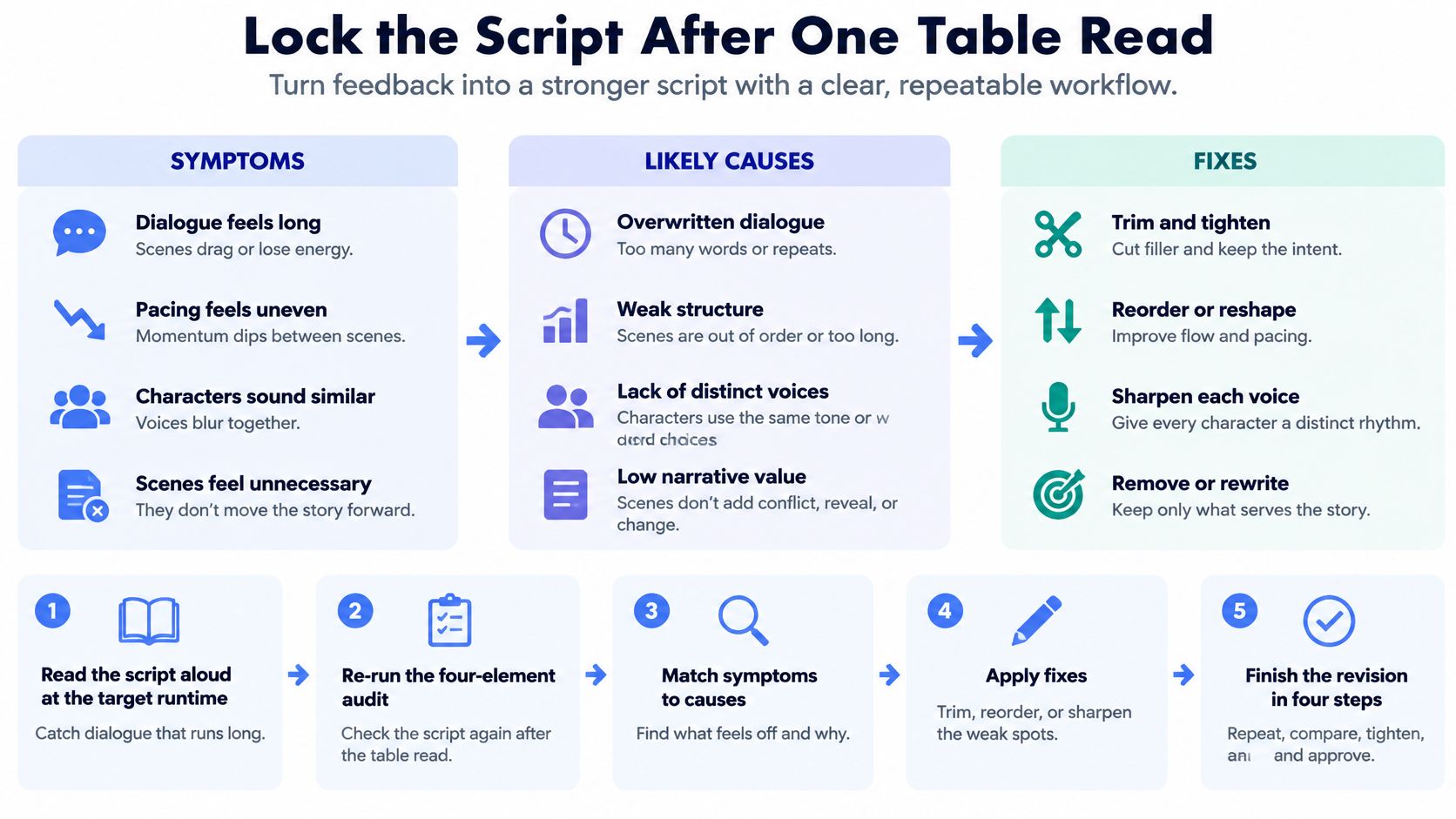
Then finish the revision in four steps. Read aloud at the target runtime. Re-run the four-element audit on every beat. Secure sign-off from whoever holds the approvals, including the final script and any talent choices. Lock the version and record which modules feed which cutdown.
Approval timing is the part writers underestimate. Ask for the review points before the first draft is due, so you know when your input is needed and when the script is final. On our projects, a Creative Producer works with the client to align the script and storyboard with their vision, and the client reviews and gives feedback on scripts, storyboards, locations and talent depending on what the video needs. We require the client's approval on elements such as the final script or talent selection, so build those checkpoints into the schedule rather than discovering them in week three.
Evo Media builds commercial scripts and shoots them with the cutdowns planned from the start, so one production day returns a master spot, vertical clips, bumpers and email cuts instead of a single film. A creative producer works alongside your team to align the script and storyboard with your vision, and your approvals on the final script and talent are built into the schedule rather than bolted on at the end. Visit Evo Media to talk through your next campaign.
Crafted with Outrank
The shoot date is booked, the media is bought, and there's a blank page in front of you with ":30" written in the corner. You know the product better than anyone in the room. What you don't have is a way to fit the problem, the proof, the brand and the ask into roughly 70 spoken words without it sounding like a feature list read aloud.
That's the actual work of how to write a commercial script. Not the dialogue. The architecture: which beat does which job, how many words each beat can afford, and what survives when the same idea gets cut to 15 seconds, watched with the sound off, and dropped into a vertical feed.
This is the sequence I'd walk a colleague through the week before a shoot, in order, with the checks that catch problems while they're still cheap to fix.
Table of Contents
Script Length and Beat Count at a Glance
Lock the master runtime before the first line of dialogue, because every beat is a removable module with a job: hook, problem, proof, brand, ask. A placement plan turns one spot into a set of interchangeable parts, so the same idea can survive a 6-second bumper, a muted vertical cut and a full 30-second paid spot.
Runtime | Approximate words | Typical beats | Common use |
|---|---|---|---|
6 seconds | 12-15 | 1 | Bumper and pre-roll placements |
15 seconds | 30-35 | 2-3 | Vertical social and short cutdowns |
30 seconds | 65-75 | 4-6 | Standard TV and paid social spot |
60 seconds | 130-150 | 6-9 | Brand films and longer web placements |
Use roughly 130 to 150 spoken words per minute as the planning assumption, then prove it with a timed read. Slower, more dramatic reads sit at the bottom of each row. Product demonstrations, legal supers and music cues eat airtime without adding a word, so a stopwatch catches what arithmetic misses.
Duration has shaped the format from the start. A historical review of television advertising records the 30-second spot becoming the average commercial length on British television in 1955, and shorter lengths and derivative cutdowns became common over time. That pressure is why a commercial script is built for simultaneity: picture, voice-over, supers, sound design and demonstration have to carry the idea together, including when the first view is silent.
The 15-second version is where drafts get exposed. It needs its own dramatic construction, with problem, benefit and brand identification compressed into two or three beats instead of six. Decide early which lengths are separate builds and which are honest trims.
The twenty percent rule: if your draft runs more than 20 percent over the word budget for its row, cut exposition before you cut the proof point. The proof point is what makes the claim believable in the time you have.
Brief the Objective, Audience and Action
A script can only be as sharp as the brief behind it, and most weak scripts are weak briefs wearing dialogue. Seven fields, in this order, give a writer everything needed and nothing extra.
One measurable objective. Demo requests, trial sign-ups, booked calls, store visits. "Awareness" alone isn't something a script can be checked against.
One primary audience action. The single thing the viewer does next. Two competing asks split attention and usually produce neither.
The pain point in the viewer's own words. Not "inefficient workflows" but "an operations manager who rebuilds the same Monday report by hand."
The brand-entry point. The moment the product first appears, written as a time code rather than left to the edit.
The proof asset you have. A customer quote, a live demonstration, a before-and-after, a verified number. If no proof exists, build the script around a demonstration instead of an assertion.
Required aspect ratios and placements. 16:9 for connected TV, 9:16 for vertical, 1:1 for feed, plus the website hero and the email cut.
Cutdown opportunities. Which beat can stand alone as a 6-second bumper, and which proof beat can run in an email with a booking line attached.
Take the B2B case: a software firm wants trial sign-ups from operations managers. The pain is manual reporting. The action is starting a free trial. The proof is a screen recording of a report built in 90 seconds, because that recording does more work than any adjective.
Placement deserves its own line. Nielsen's analysis of variables affecting television advertising performance attributes roughly 26% of significance to creativity and about 43% to placement and programming, which is why field six isn't an afterthought. The same body of work found 44% of global respondents named advertisements depicting real-life situations as the type that resonates most powerfully, so the pain point belongs in a scene people recognise, not in an abstraction.
If your team is still assembling that document, our guide to writing a commercial video production brief lays out the same fields in production order.
Sign-off rule: the brief is one paragraph, it names the objective, the action, the pain scene and the proof asset, and every stakeholder approves it before a single line of dialogue is drafted.
Build the Beats in ABCD Order
Sequence decides whether a commercial earns its length, and the order with the strongest evidence behind it runs Attract, Integrate, Connect, Direct. The pattern comes from large-scale studies of ad performance rather than any one shop's house style. Treat the four beats as interchangeable units, not one fixed storyline. A 6-second cutdown will lift a single beat out on its own, and a sound-off feed placement will strip every spoken line, so each beat has to carry its job without help from the others.
Attract is the first one to three seconds, and it should show tension or relevance through an image or a line a stranger would stop for. Integrate means the brand or product appears early enough that viewers attribute the story to it, usually inside the first third of a 30-second spot. Connect dramatises one customer problem and shows the product solving it through action, proof or a credible human situation, never a feature list. Direct closes with the brand-linked benefit and a single call to action, spoken and shown on screen at the same time.
Here is how that reads at 30 seconds for a property management app.
0 to 3 seconds, attract. A tenant's message sits unanswered on a cracked phone screen, timestamped three days ago.
Around 8 seconds, integrate. The manager's phone shows the same request already routed to a plumber.
10 to 22 seconds, connect. The plumber arrives that afternoon while the tenant watches the status change on screen.
Last 5 seconds, direct. The closing line names the app and asks for one thing, starting a trial.
I draft the direct beat before the other three. Once the ask and its on-screen wording are fixed, the earlier beats only have to earn it, and every cutdown inherits a ready-made ending.
Each beat also has its own failure mode worth checking on the page. An attract beat with no tension earns a skip. An integrate beat landing at second 20 leaves a story attributed to nobody. A connect beat where the fix happens off screen proves nothing. A direct beat carrying two asks splits the response. Catch these before dialogue goes in, because repairing them afterwards means rewriting scenes, not sentences.
Format the Script Page and Audit Each Beat
A director should be able to pick up your script and know exactly what is on screen at second 14 without asking you. That means a two-column page with time codes down the left edge: visuals on the left, audio on the right, and dialogue, voice-over, sound and on-screen text listed under each beat. Write shot descriptions in present tense, abbreviate camera directions (CU, MS, WS) and label supers as supers. Any reader should see instantly what happens on screen and in the ear at the same second, because that same clarity is what lets an editor later pull any single beat out and rebuild it for a different placement without calling you.
Voice-over lines have their own rules, and they aren't the rules of body copy.
One idea per sentence. If a line needs a comma to survive, split it into two.
Write to the picture. Delete any line that repeats what the viewer can already see happening.
Say numbers the way a person says them. "Ninety seconds" out loud, not "90s."
Mark the pauses. A half-beat of silence before the ask lands harder than a louder read of it.
Then audit every beat against four elements: an attention trigger, a brand link, an emotional or functional meaning, and an action instruction. A beat carrying none of the four is filler and should go. A beat carrying only one is usually doing half its job and needs rewriting rather than shortening. Run this audit per beat, not per script, because a weak beat drags down every cut it appears in.
Scripts fail most often at brand encoding. In a Nielsen controlled test of 49 video ads, branded recognition fell by nearly half overnight, and memory of the advertiser keeps decaying after exposure. Put a recognisable brand cue near the opening, at the proof moment and in the closing frame. Make the voice-over, supers and visuals say the same thing at those moments rather than three variations of it, since each cue has to work alone when a beat gets lifted into a shorter cut.
Before anything is finalised, pre-test a rough cut with a small audience and ask four questions: unaided brand recall, aided recognition, comprehension of the offer, and intent to take the action. If viewers remember the story but can't name the advertiser, fix the brand linkage before you touch anything else.
Write One Script That Works in Every Placement
The assumption worth challenging is that you're writing one commercial. You're writing a small system of beats that gets assembled into four or five finished pieces, and those assembly decisions belong on the page, not in the edit suite at 11pm.
The commercial case for modular scripting is straightforward. Short-form video is reported as the highest-ROI content format among marketers, while 30% of both B2B and B2C marketers use it, according to HubSpot's short-form video research. One linear master can't serve that demand; modular beats can.
Lock four modules before production starts.
A self-contained hook that works in the first two seconds with no setup.
A demonstration with one visible state change, so silent autoplay still communicates the benefit.
A proof point that can be lifted out without breaking the story for anyone who never sees it.
Call-to-action variants matched to funnel stage, such as a learn-more line for cold audiences and a book-a-demo line for warm ones.
Say a hospitality brand writes a 30-second master. It then cuts a 15-second vertical that opens on the terrace view, a 6-second bumper built around the moment the room key lifts from the desk, and an email version that runs the guest testimonial beat with a booking call to action. Each cut earns attention on its own terms because each was designed as a beat, not carved out of a continuous narrative.
Mark in the script which beats are fixed and which can be reordered. That single convention saves arguments later.
This also settles a budgeting question teams ask too late. Judge a shoot by the number of usable, platform-specific assets it produces, not by one finished film. Tell the production team which modules must be captured on the day, so the vertical hook and the proof beat exist before the crew leaves the location. Our breakdown of how to repurpose one video into 10 assets covers the capture list in detail.
Script for Sound-Off Viewing and Accessibility
Play your draft with the sound off. If the point disappears, the script isn't finished. Feed autoplay, office viewing and public transport all strip the audio away, and a beat that only works through vocal emphasis is a beat that only works for a fraction of the audience.
The gap is measurable. An analysis of 650,000 creative video assets and nearly 12 million ad deliveries across more than 100 countries found that nine in ten television ads lacked closed captions or audio descriptions, according to Decision Marketing's reporting on the accessibility gap. The same reporting cites research associating captions with an 8% lift in ad recall and an 18% increase in brand linkage. Accessibility isn't a compliance line item. It's a performance variable.
So move the essential meaning into the picture. If a line of dialogue or a music cue carries the key point, rebuild the beat so a silent viewer still gets it. Use on-screen text to add information rather than transcribe every spoken word. During a product demonstration, label the state change with the result, such as "Report exported in 4 seconds," and the claim survives with the volume at zero.
Trade-offs exist and they need resolving before the shoot, not in the grade.
Captions versus demonstration. Running a full caption track over a fast product demo splits attention. Shorten the line or hold the shot longer.
Legal disclosures. They need enough screen time to be read at normal pace, which means budgeting for them in the runtime rather than squeezing them into the final two seconds.
Audio description. Note the visual actions a described version would need to cover, so the essential action happens on screen rather than being implied.
Settle the information hierarchy on the page: spoken dialogue first, then key visual action, then on-screen text, then music and sound effects. A script that lists all five under each beat, with caption intent and audio-description notes, is a script that can be shot once and shipped everywhere. Our notes on social media video formats show where those silent-first versions usually land.
Lock the Script After One Table Read
The table read is the cheapest quality check available. Read the whole script aloud at the target runtime with a stopwatch running, then match what you hear against the symptoms below and fix the cause, not the line.
Symptom | Likely cause | Fix |
|---|---|---|
Viewers remember the story but not the brand | Brand appears late or only as an end card | Move the brand cue into the opening beat and the proof beat |
Clear story but no one acts | Call to action is vague or competes with other asks | Keep one call to action and repeat it in dialogue and on-screen text |
Feels rushed at 15 seconds | A 30-second script was simply shortened | Rebuild as a separate 15-second construction |
Confusing with the sound off | Meaning lives only in voice-over or music | Move the key meaning into visuals and on-screen text |
Recall drops in the 24-hour test | Dense claims reduce emotional encoding | Cut to one proof point and one payoff |
Works on the master but not on vertical | Linear master with no modular scenes | Mark fixed and reorderable modules and cut a vertical version |
Then finish the revision in four steps. Read aloud at the target runtime. Re-run the four-element audit on every beat. Secure sign-off from whoever holds the approvals, including the final script and any talent choices. Lock the version and record which modules feed which cutdown.
Approval timing is the part writers underestimate. Ask for the review points before the first draft is due, so you know when your input is needed and when the script is final. On our projects, a Creative Producer works with the client to align the script and storyboard with their vision, and the client reviews and gives feedback on scripts, storyboards, locations and talent depending on what the video needs. We require the client's approval on elements such as the final script or talent selection, so build those checkpoints into the schedule rather than discovering them in week three.
Evo Media builds commercial scripts and shoots them with the cutdowns planned from the start, so one production day returns a master spot, vertical clips, bumpers and email cuts instead of a single film. A creative producer works alongside your team to align the script and storyboard with your vision, and your approvals on the final script and talent are built into the schedule rather than bolted on at the end. Visit Evo Media to talk through your next campaign.
Crafted with Outrank
READ NEXT

Video Background on Website: How to Add One That Stays Fast

Product video production for software demos
Product video production for software demos: choose a focused workflow, scope the right deliverables, and brief a partner around buyer decisions.

How to scope a social media video production batch
Scope social media video production around concepts, versions, rights, and approvals. Define deliverables clearly before requesting a production quote.