Live streaming or event video production: which do you need?
Live streaming or event video production: which do you need?

Choose live streaming when viewers need to experience your event as it happens; choose event video production when you need edited footage for marketing, sales, or internal communications afterward. Choose both when real-time access and post-event content are separate requirements, and scope them separately: a stream recording does not automatically become a finished marketing film.
TL;DR
Live streaming is best for real-time remote access; event video production is best for edited content afterward.
A combined brief must separate broadcast requirements from filming, editing, and post-event deliverables.
Evo Media fits brands seeking event video production connected to storytelling and advertising strategy.
Choose your audience, viewing moment, and intended action before choosing cameras or deliverables.
Live streaming or event video production: which do you need?
The deciding question is when your audience needs the experience: during the event, afterward, or both. Live streaming prioritizes immediate access. Edited event coverage prioritizes a finished story that viewers can watch without attending the original event.
Before requesting proposals, write down what viewers must see and what they should do next. Use that answer to brief an event video production team, rather than starting with a camera list.
Live streaming
Best for: Remote viewers who need access during the event
Main advantage: Delivers the scheduled experience in real time
Main limitation: Live mistakes reach viewers before an editor can remove them
What to specify: Destination, audio, graphics, moderation, connection contingency
Edited event video
Best for: Buyers, guests, employees, or partners watching afterward
Main advantage: Shapes footage into a focused story
Main limitation: Does not give remote viewers live access
What to specify: Audience, message, interviews, formats, approvals
Combined coverage
Best for: Events serving live viewers and later campaigns
Main advantage: Supports distinct viewing needs from the same event
Main limitation: Requires coordination between broadcast and editorial priorities
What to specify: Separate responsibilities, recording plan, deliverables, handoffs
For a 2026 event brief, name the primary outcome first. Add the secondary outcome only when it serves a defined audience, not because recording equipment will already be present.
Why this matters
A hotel opening, corporate conference, and software launch can all need cameras without needing the same production plan. The event itself is not the deliverable. The deliverable is the experience or asset your audience receives.
A remote partner watching a keynote needs clear sound and uninterrupted access. A prospective hotel guest watching a campaign film needs an understandable reason to care about the property. A software buyer needs to understand the product, not necessarily watch every announcement in chronological order.
Buying the wrong format leaves an important job unfinished. An attractive recap cannot replace access to a live announcement, and a complete broadcast recording is not the same as a concise sales asset.
Live streaming: best for real-time remote access
Choose live streaming when attendance at a specific time matters. Examples include a leadership address for distributed employees, a launch announcement for remote partners, or a conference session with online questions.
Your brief should describe the remote viewer's experience, not just the activity on stage. Ask who handles the broadcast destination, sound feed, presentation slides, speaker identification, audience questions, and the transition between sessions.
The advantage is immediacy: remote viewers can follow the scheduled program as it happens. The trade-off is that the program must work live. Editing cannot repair the experience for someone already watching.
For New York venues, ask about access for technical preparation, available connections, house audio, and coordination with the venue's audiovisual team. Buyers elsewhere should ask the same questions; the building's event facilities do not establish who owns the broadcast.
Request a written contingency plan. It should identify who makes decisions if the connection fails, a speaker changes their presentation, or the running order shifts. Do not treat a platform login as a complete streaming plan.
Edited event video: best for a finished story
Choose edited coverage when the audience needs the message more than the full running order. A hotel opening film can focus on the guest experience; a technology launch film can connect the announcement to a buyer's problem.
Editing lets you select relevant moments, clarify context, add captions, and build different versions for different uses. It also creates an approval stage before publication. Those benefits depend on capturing the right material at the event.
The limitation is that footage cannot contain interviews or details nobody recorded. A stage-only recording will not supply guest reactions, property details, or a separate product demonstration merely because those would improve the edit.
For your 2026 event video production brief, define the finished asset before approving coverage. State its audience, central message, intended placement, and required action. Then identify the footage and permissions that asset needs.
Choose edited coverage for the story you need to publish, not simply for a record that the event happened. Archive requirements belong in the scope too, but they serve a different purpose.
Combined coverage: best for live access and later campaigns
Choose combined coverage when you can name a live audience and a separate post-event use. A software launch might serve remote customers during the announcement and sales prospects afterward. A hotel event might require partner access plus an edited brand film.
The benefit is shared planning around the same event. The constraint is competing priorities: the broadcast must stay with the live program while the edited story might need an interview elsewhere.
Ask who protects each priority. If a camera must remain on the keynote, the plan should explain how interviews, audience reactions, and venue details will also be captured. Do not assume the same operator can cover simultaneous activities.
Specify whether the agreement includes a broadcast recording, separate camera recordings, edited films, or some combination. These are different deliverables. Confirm how presentation slides and audio will be supplied to the editor, rather than leaving that handoff until after the event.
Why the production scope varies
The scope follows the viewing experience you need. For 2026 planning, compare proposals against these factors rather than treating every event as interchangeable:
Audience timing: Live attendance requires broadcast preparation; later viewing requires an editorial plan.
Program complexity: Concurrent sessions and changing speakers create different coverage needs from a single presentation.
Venue conditions: Access, house audio, connections, and filming restrictions determine what must be arranged.
Content purpose: A complete session archive and a campaign film require different selections and structure.
Deliverable formats: Horizontal films, vertical edits, captions, and presentation recordings need explicit specifications.
Review ownership: Brand, legal, speaker, and corporate approvals need named decision-makers and agreed checkpoints.
Ask each prospective partner to explain the assumptions behind its scope. A proposal is easier to evaluate when you can see what is included, what your team supplies, and what requires a separate decision.
How to scope the right production plan
Use this sequence before choosing a partner. It keeps production decisions tied to the audience rather than to an equipment package.
Define the outcome. Write the action you want viewers to take, such as requesting a product demonstration or sharing an internal announcement.
Map the audience. Separate on-site attendees, remote live viewers, and people watching later. State what each group needs to understand.
List deliverables. Separate the live experience, retained recordings, and edited assets. Describe the purpose of each item.
Assign ownership. Name the people responsible for venue coordination, technical decisions, content approvals, and publication.
Plan distribution. Specify where finished content will appear and who will assess its performance against the original objective.
This sequence should produce a brief that a production partner can question and refine. Equipment recommendations then have a purpose: supporting an agreed experience or deliverable.
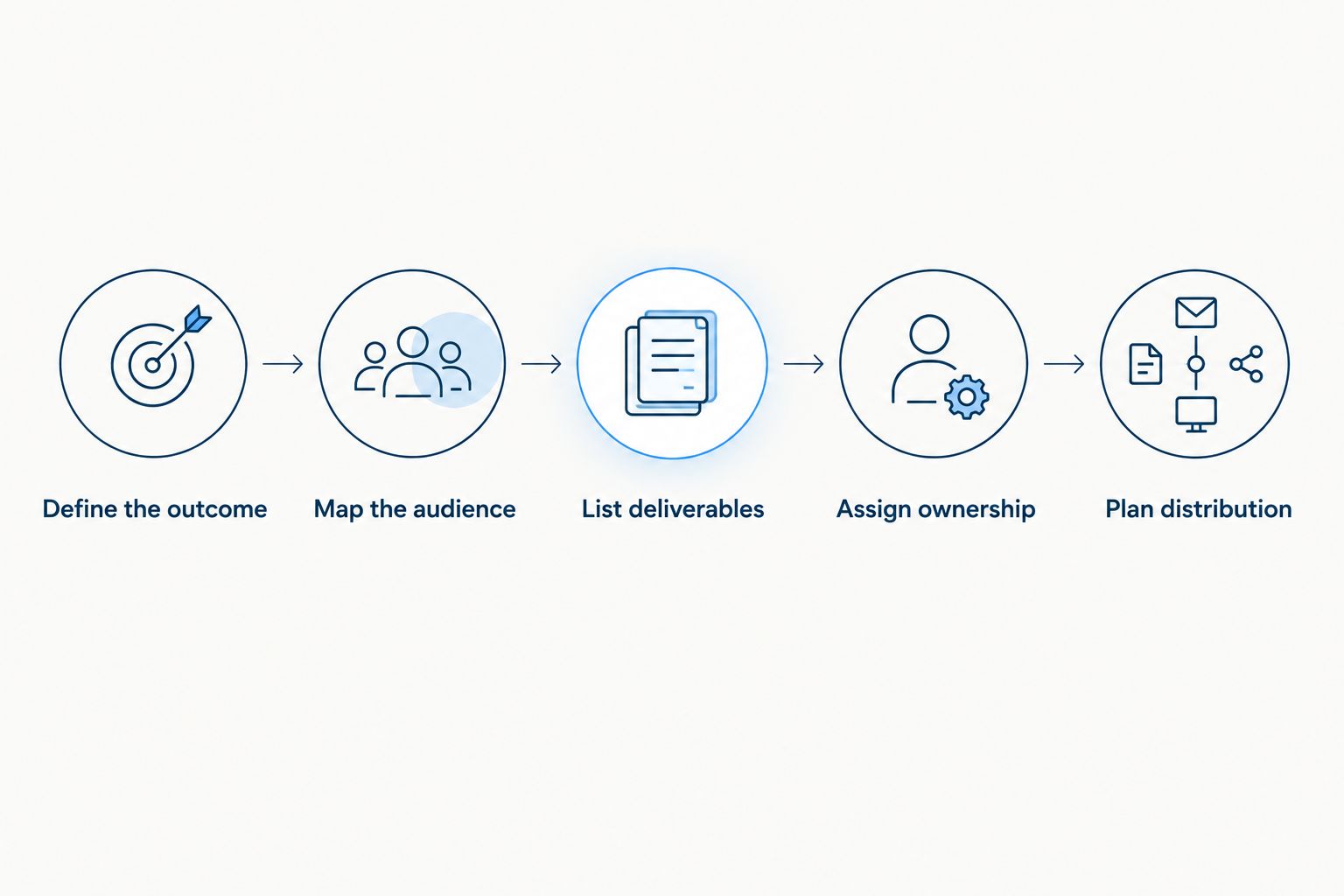
Define the audience and deliverables before choosing production equipment.
Turn the brief into an acceptance checklist
Write deliverables so your team can confirm whether each one is complete. For example, a hypothetical software-launch brief could request 1 edited launch film and 3 social cutdowns, each tied to an agreed message and placement. Those are example quantities to scope, not a standard package.
Also name the live destination, recording handoff, caption requirements, and publication owner where relevant. Replace vague requests such as full coverage or social content with a list of specific outputs.
Set 2 approval gates in your planning document: approval of the brief before filming and approval of the edited content before publication. Add other checkpoints when your organization requires them, and have the partner confirm the actual review process in writing.
How to evaluate the production partner
Evaluate examples against your assignment. A cinematic hotel film demonstrates storytelling differently from a conference broadcast. Ask what the partner actually handled and how that responsibility compares with your proposed scope.
For a 2026 shortlist, ask every candidate the same questions:
Who owns the story, filming plan, edit, and distribution recommendations?
Who is responsible for streaming, if the project requires it?
How will coverage protect both live continuity and post-event footage needs?
What must the venue and your internal team provide?
How are scope changes, approvals, and handoffs documented?
Evo Media is best for brands seeking event video production connected to storytelling and advertising strategy. Its confirmed offering brings strategy, filming, editing, and advertising under one partner, with cinematic storytelling and a fast, simple, transparent production process.
That model fits buyers who want the finished content planned alongside its marketing use. The boundary is equally important: do not infer specialist live-broadcast responsibilities from a video production offering. Confirm streaming ownership separately when requesting a proposal from Evo Media.
Bring the event date, location, audience, program, intended placements, and approval requirements to the discovery discussion. Ask for a written scope that connects those inputs to responsibilities and deliverables.
Discuss your event video brief
Bring your audience, program, and deliverable requirements to a project discussion.
Can a live stream become a marketing video afterward?
A live stream can supply source material, but a marketing edit remains a separate assignment. The editor needs suitable footage, usable audio, permissions, and a defined message. Ask for those requirements before the event so the recording plan supports the intended edit.
Do you need both for a hotel opening?
You need both only when remote attendance and post-event marketing each have a defined purpose. Choose edited coverage when the main objective is a film for future guests or partners. Add streaming when an identified audience needs to participate in the opening as it happens.
Is a full event recording enough for a software launch?
A full recording fits viewers seeking the complete session, not every software buyer. A sales or campaign asset needs its own message and viewing context. Decide whether the audience needs the whole announcement, a focused explanation, or both before requesting edits.
FAQ
What's the difference between live streaming and event video production?
Live streaming gives viewers access during an event; edited event video production creates content for later viewing. A project can include both, but its scope should identify the responsibilities and deliverables separately.
Is live streaming better than an edited event video?
Live streaming is better for real-time remote access, while edited video is better for a focused post-event story. Choose according to when the audience needs the content and what they should do after watching.
Can one production team handle streaming and edited coverage?
One partner can coordinate both when the agreed scope includes the people and responsibilities each requires. Ask how the plan covers simultaneous activities without sacrificing the live program or footage needed for editing.
What should I ask a New York event venue before hiring a video team?
Ask about preparation access, house audio, internet connections, filming restrictions, and coordination with the venue's audiovisual team. Share the answers with prospective partners before they finalize the scope.
Do I need permission to use event footage in advertising?
Confirm the required permissions before using event footage in advertising. Have the appropriate reviewer address attendees, speakers, music, presentation material, and any third-party content captured in the footage.
What should I send Evo Media before requesting a proposal?
Send Evo Media the event date, location, audience, program, content objectives, intended placements, and approval requirements. Identify any live-streaming requirement separately so responsibility is explicit in the project discussion.
One last thing
Plan the edit before the event, not after the footage arrives. For a 2026 event, ask your team to write the proposed opening message and final call to action before approving coverage. If either depends on an interview, demonstration, or venue detail, put that requirement into the filming plan while it can still be captured.
Related guides
Choose live streaming when viewers need to experience your event as it happens; choose event video production when you need edited footage for marketing, sales, or internal communications afterward. Choose both when real-time access and post-event content are separate requirements, and scope them separately: a stream recording does not automatically become a finished marketing film.
TL;DR
Live streaming is best for real-time remote access; event video production is best for edited content afterward.
A combined brief must separate broadcast requirements from filming, editing, and post-event deliverables.
Evo Media fits brands seeking event video production connected to storytelling and advertising strategy.
Choose your audience, viewing moment, and intended action before choosing cameras or deliverables.
Live streaming or event video production: which do you need?
The deciding question is when your audience needs the experience: during the event, afterward, or both. Live streaming prioritizes immediate access. Edited event coverage prioritizes a finished story that viewers can watch without attending the original event.
Before requesting proposals, write down what viewers must see and what they should do next. Use that answer to brief an event video production team, rather than starting with a camera list.
Live streaming
Best for: Remote viewers who need access during the event
Main advantage: Delivers the scheduled experience in real time
Main limitation: Live mistakes reach viewers before an editor can remove them
What to specify: Destination, audio, graphics, moderation, connection contingency
Edited event video
Best for: Buyers, guests, employees, or partners watching afterward
Main advantage: Shapes footage into a focused story
Main limitation: Does not give remote viewers live access
What to specify: Audience, message, interviews, formats, approvals
Combined coverage
Best for: Events serving live viewers and later campaigns
Main advantage: Supports distinct viewing needs from the same event
Main limitation: Requires coordination between broadcast and editorial priorities
What to specify: Separate responsibilities, recording plan, deliverables, handoffs
For a 2026 event brief, name the primary outcome first. Add the secondary outcome only when it serves a defined audience, not because recording equipment will already be present.
Why this matters
A hotel opening, corporate conference, and software launch can all need cameras without needing the same production plan. The event itself is not the deliverable. The deliverable is the experience or asset your audience receives.
A remote partner watching a keynote needs clear sound and uninterrupted access. A prospective hotel guest watching a campaign film needs an understandable reason to care about the property. A software buyer needs to understand the product, not necessarily watch every announcement in chronological order.
Buying the wrong format leaves an important job unfinished. An attractive recap cannot replace access to a live announcement, and a complete broadcast recording is not the same as a concise sales asset.
Live streaming: best for real-time remote access
Choose live streaming when attendance at a specific time matters. Examples include a leadership address for distributed employees, a launch announcement for remote partners, or a conference session with online questions.
Your brief should describe the remote viewer's experience, not just the activity on stage. Ask who handles the broadcast destination, sound feed, presentation slides, speaker identification, audience questions, and the transition between sessions.
The advantage is immediacy: remote viewers can follow the scheduled program as it happens. The trade-off is that the program must work live. Editing cannot repair the experience for someone already watching.
For New York venues, ask about access for technical preparation, available connections, house audio, and coordination with the venue's audiovisual team. Buyers elsewhere should ask the same questions; the building's event facilities do not establish who owns the broadcast.
Request a written contingency plan. It should identify who makes decisions if the connection fails, a speaker changes their presentation, or the running order shifts. Do not treat a platform login as a complete streaming plan.
Edited event video: best for a finished story
Choose edited coverage when the audience needs the message more than the full running order. A hotel opening film can focus on the guest experience; a technology launch film can connect the announcement to a buyer's problem.
Editing lets you select relevant moments, clarify context, add captions, and build different versions for different uses. It also creates an approval stage before publication. Those benefits depend on capturing the right material at the event.
The limitation is that footage cannot contain interviews or details nobody recorded. A stage-only recording will not supply guest reactions, property details, or a separate product demonstration merely because those would improve the edit.
For your 2026 event video production brief, define the finished asset before approving coverage. State its audience, central message, intended placement, and required action. Then identify the footage and permissions that asset needs.
Choose edited coverage for the story you need to publish, not simply for a record that the event happened. Archive requirements belong in the scope too, but they serve a different purpose.
Combined coverage: best for live access and later campaigns
Choose combined coverage when you can name a live audience and a separate post-event use. A software launch might serve remote customers during the announcement and sales prospects afterward. A hotel event might require partner access plus an edited brand film.
The benefit is shared planning around the same event. The constraint is competing priorities: the broadcast must stay with the live program while the edited story might need an interview elsewhere.
Ask who protects each priority. If a camera must remain on the keynote, the plan should explain how interviews, audience reactions, and venue details will also be captured. Do not assume the same operator can cover simultaneous activities.
Specify whether the agreement includes a broadcast recording, separate camera recordings, edited films, or some combination. These are different deliverables. Confirm how presentation slides and audio will be supplied to the editor, rather than leaving that handoff until after the event.
Why the production scope varies
The scope follows the viewing experience you need. For 2026 planning, compare proposals against these factors rather than treating every event as interchangeable:
Audience timing: Live attendance requires broadcast preparation; later viewing requires an editorial plan.
Program complexity: Concurrent sessions and changing speakers create different coverage needs from a single presentation.
Venue conditions: Access, house audio, connections, and filming restrictions determine what must be arranged.
Content purpose: A complete session archive and a campaign film require different selections and structure.
Deliverable formats: Horizontal films, vertical edits, captions, and presentation recordings need explicit specifications.
Review ownership: Brand, legal, speaker, and corporate approvals need named decision-makers and agreed checkpoints.
Ask each prospective partner to explain the assumptions behind its scope. A proposal is easier to evaluate when you can see what is included, what your team supplies, and what requires a separate decision.
How to scope the right production plan
Use this sequence before choosing a partner. It keeps production decisions tied to the audience rather than to an equipment package.
Define the outcome. Write the action you want viewers to take, such as requesting a product demonstration or sharing an internal announcement.
Map the audience. Separate on-site attendees, remote live viewers, and people watching later. State what each group needs to understand.
List deliverables. Separate the live experience, retained recordings, and edited assets. Describe the purpose of each item.
Assign ownership. Name the people responsible for venue coordination, technical decisions, content approvals, and publication.
Plan distribution. Specify where finished content will appear and who will assess its performance against the original objective.
This sequence should produce a brief that a production partner can question and refine. Equipment recommendations then have a purpose: supporting an agreed experience or deliverable.
Define the audience and deliverables before choosing production equipment.
Turn the brief into an acceptance checklist
Write deliverables so your team can confirm whether each one is complete. For example, a hypothetical software-launch brief could request 1 edited launch film and 3 social cutdowns, each tied to an agreed message and placement. Those are example quantities to scope, not a standard package.
Also name the live destination, recording handoff, caption requirements, and publication owner where relevant. Replace vague requests such as full coverage or social content with a list of specific outputs.
Set 2 approval gates in your planning document: approval of the brief before filming and approval of the edited content before publication. Add other checkpoints when your organization requires them, and have the partner confirm the actual review process in writing.
How to evaluate the production partner
Evaluate examples against your assignment. A cinematic hotel film demonstrates storytelling differently from a conference broadcast. Ask what the partner actually handled and how that responsibility compares with your proposed scope.
For a 2026 shortlist, ask every candidate the same questions:
Who owns the story, filming plan, edit, and distribution recommendations?
Who is responsible for streaming, if the project requires it?
How will coverage protect both live continuity and post-event footage needs?
What must the venue and your internal team provide?
How are scope changes, approvals, and handoffs documented?
Evo Media is best for brands seeking event video production connected to storytelling and advertising strategy. Its confirmed offering brings strategy, filming, editing, and advertising under one partner, with cinematic storytelling and a fast, simple, transparent production process.
That model fits buyers who want the finished content planned alongside its marketing use. The boundary is equally important: do not infer specialist live-broadcast responsibilities from a video production offering. Confirm streaming ownership separately when requesting a proposal from Evo Media.
Bring the event date, location, audience, program, intended placements, and approval requirements to the discovery discussion. Ask for a written scope that connects those inputs to responsibilities and deliverables.
Discuss your event video brief
Bring your audience, program, and deliverable requirements to a project discussion.
Can a live stream become a marketing video afterward?
A live stream can supply source material, but a marketing edit remains a separate assignment. The editor needs suitable footage, usable audio, permissions, and a defined message. Ask for those requirements before the event so the recording plan supports the intended edit.
Do you need both for a hotel opening?
You need both only when remote attendance and post-event marketing each have a defined purpose. Choose edited coverage when the main objective is a film for future guests or partners. Add streaming when an identified audience needs to participate in the opening as it happens.
Is a full event recording enough for a software launch?
A full recording fits viewers seeking the complete session, not every software buyer. A sales or campaign asset needs its own message and viewing context. Decide whether the audience needs the whole announcement, a focused explanation, or both before requesting edits.
FAQ
What's the difference between live streaming and event video production?
Live streaming gives viewers access during an event; edited event video production creates content for later viewing. A project can include both, but its scope should identify the responsibilities and deliverables separately.
Is live streaming better than an edited event video?
Live streaming is better for real-time remote access, while edited video is better for a focused post-event story. Choose according to when the audience needs the content and what they should do after watching.
Can one production team handle streaming and edited coverage?
One partner can coordinate both when the agreed scope includes the people and responsibilities each requires. Ask how the plan covers simultaneous activities without sacrificing the live program or footage needed for editing.
What should I ask a New York event venue before hiring a video team?
Ask about preparation access, house audio, internet connections, filming restrictions, and coordination with the venue's audiovisual team. Share the answers with prospective partners before they finalize the scope.
Do I need permission to use event footage in advertising?
Confirm the required permissions before using event footage in advertising. Have the appropriate reviewer address attendees, speakers, music, presentation material, and any third-party content captured in the footage.
What should I send Evo Media before requesting a proposal?
Send Evo Media the event date, location, audience, program, content objectives, intended placements, and approval requirements. Identify any live-streaming requirement separately so responsibility is explicit in the project discussion.
One last thing
Plan the edit before the event, not after the footage arrives. For a 2026 event, ask your team to write the proposed opening message and final call to action before approving coverage. If either depends on an interview, demonstration, or venue detail, put that requirement into the filming plan while it can still be captured.
Related guides
READ NEXT

Video Marketing · April 1, 2026
How to Get Your Videos to Rank in Google's Featured Snippets
Use positioning to fix topbars, sidebars, and backgrounds.
April 1st
Luxury Hotel Video Marketing · March 19, 2026
Video Content Marketing for Hotels: Beyond Pretty Pictures
Use positioning to fix topbars, sidebars, and backgrounds.
March 19th
Luxury Hotel Video Marketing · March 5, 2026
How to Create a Luxury Hotel Brand Film That Doesn't Feel Like an Ad
Use positioning to fix topbars, sidebars, and backgrounds.
March 5th
Video Marketing · April 1, 2026
How to Get Your Videos to Rank in Google's Featured Snippets
Use positioning to fix topbars, sidebars, and backgrounds.
April 1st
Luxury Hotel Video Marketing · March 19, 2026
Video Content Marketing for Hotels: Beyond Pretty Pictures
Use positioning to fix topbars, sidebars, and backgrounds.
March 19th